Strings #
As discussed in the Arrays section, strings in C are stored as an array of characters using the char data type:
1. char name[75];			//Declares an array of characters with 75 elements
2. char name[] = "strings in C";	//Declares an array called name with the elements 'strings in C'
The 1st option above will create an array of 75 chars. The 2nd option above will create an array called name, which has been filled with the characters strings in c.
The C compiler will create an array and populate the array with a sequence of characters as shown below.
NOTE: The compiler automatically appends the null character
\0at the end by default.

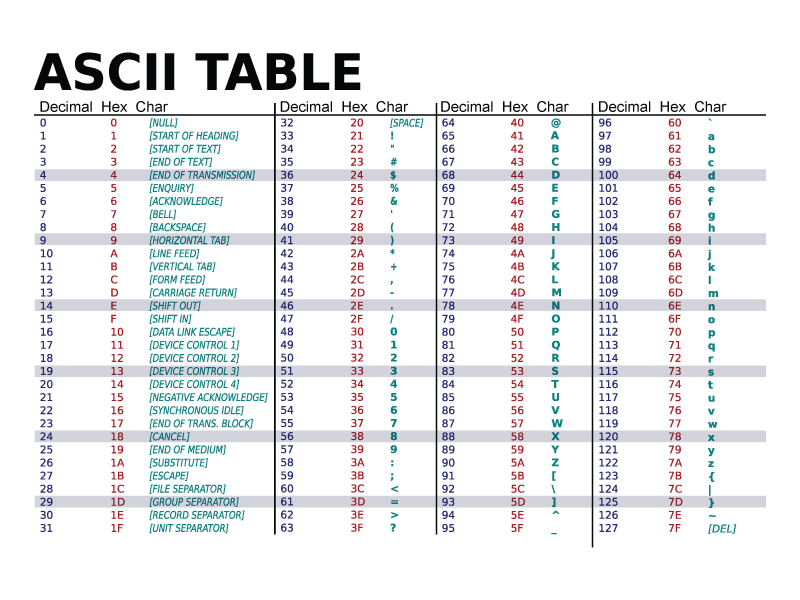
Text stored in this array is stored as integers, with ASCII codes representing each letter as an integer.
The letter s is stored as the decimal value 115. If it was a ‘S’ the decimal value would be 83.
Assigning Values to Strings #
Assigning Values to Strings
As previously mentioned, strings in C are difficult to work with. One example of this is that the assignment operator,=is NOT supported. For example:
|
|
String Manipulation #
We will sometimes need to manipulate strings to solve an issue. To help with string manipulation C supports pre-defined string functions that are stored in a header file called string.h.
Some of the most commonly used funcitons in this header file are:
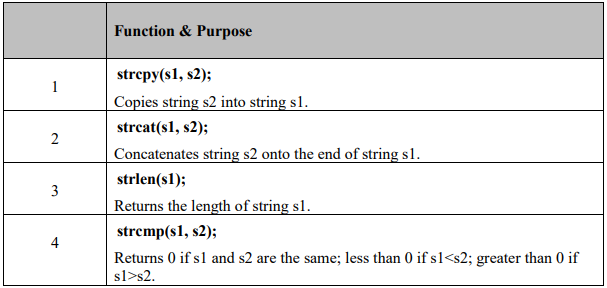
An example of using these is shown below:
|
|
fgets() and puts() #
fgets() is a function in the stdio.h header file that is used to read in data from the keyboard. This function can be used to over the issue of reading in strings with spaces that is encountered with using
scanf(). It is used as follows:
fgets(string_name, sizeof(string_name), stdin); – This will read in a string and store it in the array called string_name.
The sizeof(string_name) will take the size of the array that we defined and will limit the number of characters that can be into the array to that number.
An example of using these is shown below:
|
|
Code Output:

In the example above, puts() was used to print the string to the screen. The printf() could also have been used to prinf the string to the screen as has been shown previously.
If the user enters more characters than has been defined, the extra characters will be ignore.sizeof()ensures that only the defined number of characters can be entered. This is the reason thatfgets()is used instead of another known funcitongets(). Thegets()function allows any lenght of characers to be input which could cause a buffer overflow. Buffer overlfows need to be avoided.