Arrays #
Until now we have worked only with single variables, capable of holding a single value. There will be situations where we will need to store data in a more organized manner and there is a collection type in C called the array. An array is simply a collection of variables of the same data type laid out next to each other in memory and accessed under a common name by their position in the collection.
To define an array we use the following syntax:
int numbers[10];
This will declare an array of 10 integers, in an array named numbers. Always name your arrays with a plural as it gives a clue that you are working with more than one variable. Likewise your regular variables should be named in the singular.
Arrays will not be initialized with useful values so we must never read from an array before we have written a value to it.
To access an element of the array we use the subscript operator [], and give the number of the element we wish to access. Elements are numbered beginning with 0. Therefore, if you have an array with 5 elements, the 1st element will be in location 0, the 2nd element will be in location 1 and the last (5th) element will be in location 4. It is very important to remember this numbering system.
To assign a value to an element of the array we use the following syntax:
numbers[0] = 5;
This will store the value 6 at position 0 in the array, the first position. We can use indices 0 to 9 to access our elements for our array with 10 elements. The elements will always be 0 to n-1 the size of the array. C will happily let you go outside the bounds of your array and cause mayhem in other areas of the program so you need to be smart about how you use them.
To retrieve a value, we simply use numbers[0] on the right hand of an expression:
a = numbers[0];
This will now assign ‘a’ with the value that is stored in location numbers[0]. If we wanted the value stored in the 3rd location of the array we would use numbers[2] The nice thing about array indices is that they don’t have to be literal integers, they can be anything at all that gets evaluated as an integer. This allows us to use variables with for loops, for example, to iterate through the contents of an array:
int numbers[10];

for(int i = 0; i < 10; i++)
{
   printf("Please enter a number: ");
   scanf("%d",&numbers[i]);
}

for(int i = 0; i < 10; i++)
{
   printf("The number at location %d is %d", i, numbers[i]);
}
The above code will ask the user to enter 10 numbers from the keyboard and then print them back to the screen.
Strings #
Text can also be stored in arrays when you use the char type:
1. char name[75];			//Declares an array of characters with 75 elements
2. char name[] = "strings in C";	//Declares an array called name with the elements 'strings in C'
The 1st option above will create an array of 75 chars, which can then be used with scanf and printf like this:
printf("Please enter your name: ");
scanf("%s",&name);
printf("Hello, %s",name);
The 2nd option above will create an array caled name, which has been filled with the characters strings in c. This can be used printf like this:
printf("The string stored in name[] is: %s",name);
The C compiler will create an array and populate the array with a sequence of characters as shown below.
NOTE: The compiler automatically appends the null character
\0at the end by default.

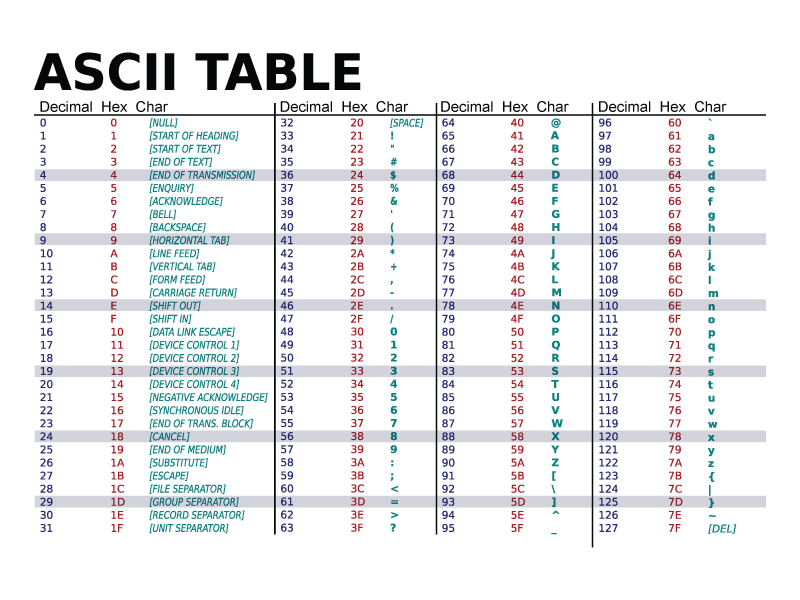
Text stored in this array is stored as integers, with ASCII codes representing each letter as an integer.
The letter s is stored as the decimal value 115. If it was a ‘S’ the decimal value would be 83.